For installers, MSPs and IT services firms
Plan the WiFi. Hand over the report.
Design on your client’s floor plan in the browser, let Pro size and place the access points on the real walls, and hand over a branded PDF with the bill of materials and the cabling. €39 once, not $360 to $1,200 a year.
No account, nothing to install. Free for one floor; Pro when you hand it to a client.
What it does on a job
-
Sizes and places the access points
“How many APs do I need?” places access points of the model you will install until 95% of the floor gets -67 dBm or better, checks the device load (50 devices per radio), and takes whichever needs more. Optimise moves the ones you placed. Deterministic, on the real walls.
How it works -
Hands over a branded report
A landscape A4 PDF with your logo, the client and the site on the cover, a page per floor, the device schedule and bill of materials, and the method with its ±6 to 10 dB error stated. English or German.
How it works -
Plans the cabling and PoE
Place a wiring closet: every access point gets a measured run, checked against the 90 m limit, with the PoE switch, patch panels and cable boxes to buy, and a cable schedule CSV for the quote.
How it works -
Every floor, every channel
Multi-floor plans with the loss of each slab, so an access point upstairs counts downstairs. Automatic channel assignment for the country you set, using DFS channels only when the others would clash.
How it works -
154 models from 20 vendors
Each with its own datasheet transmit power and antenna gain per band, wall or ceiling mount, and the datasheet linked. Anything else by its figures. Mix vendors on one plan.
How it works -
Walls traced in one click
Upload the client’s PNG, JPG or PDF plan, set the scale with one known length, and Trace walls finds the straight walls. You set the materials; the outer walls start as concrete.
How it works
A PNG is what you paste in a chat. This is what you hand a client.
Every paid plan exports a landscape A4 PDF with your logo and company name on the cover, the client and the site named, and the coverage figure up front. It is built in your browser like everything else, so the floor plan never leaves your machine.
Open the sample report (PDF, 5 pages)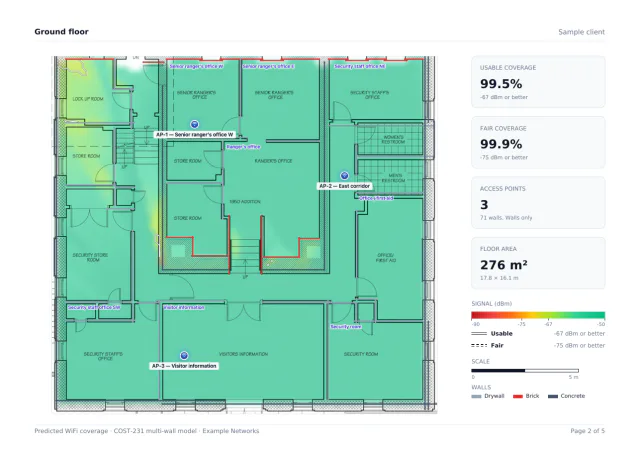
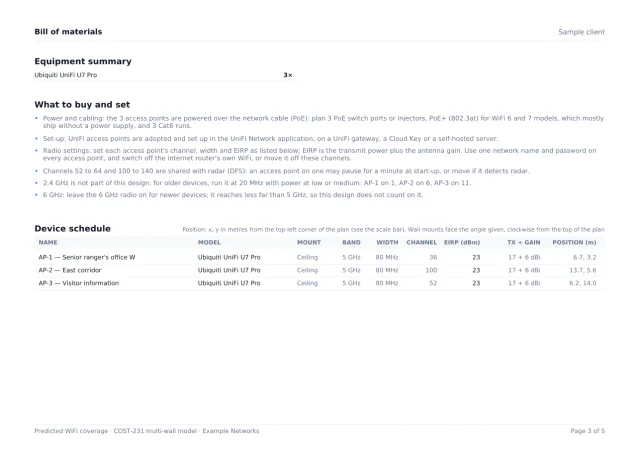
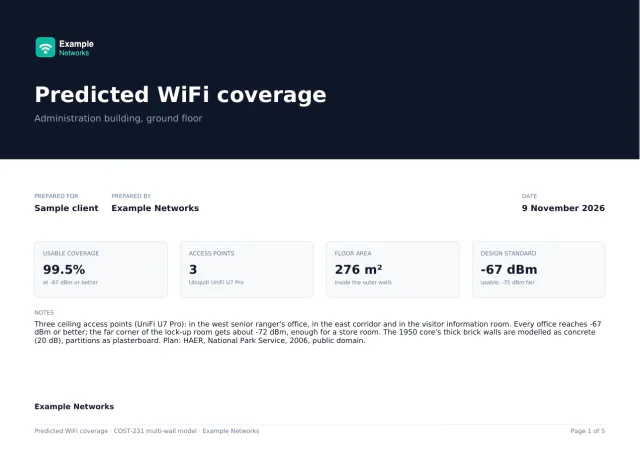
Pages from a real export: a sample office plan (HAER, National Park Service, public domain), designed in the editor and branded for a made-up installer.
- Cover
- Your logo and company name, the client, the site, the date and the building-wide coverage figure.
- A page per floor
- The heatmap at full resolution, that floor’s coverage statistics and the signal legend.
- Device schedule
- What to buy and how to set it up, then every access point with its radio settings, channel and position in metres.
- Methodology
- The model, the exact attenuation figure used for each material, and the ±6 to 10 dB error stated plainly.
- CapacityWhen it applies
- Added when you have said what the rooms are for. Skipped when you have not.
- Cabling and PoEWhen it applies
- Added when the plan has a wiring closet: every run with its length and 90 m check, and what to buy.
Paid once, not every month
The other professional planners here bill by the month, the half-year or the licence. Pro is one payment, and the €9 Pass covers a single job. Their tools do more (measured surveys, DWG and Ekahau import, teams); if you need those, they are the better choice.
| Tool | Price |
|---|---|
| WiFi Heatmap Pro | €39 onceor €29 a year, or €9 for 7 days; same features |
| WiFi Weave | $29.99 to $99.99 a month$360 to $1,200 a year; checked 19 November 2026 |
| Hamina Wireless | Free / $590+paid tier, per 6 months; checked 19 November 2026 |
| Ekahau AI Pro | from $1,495a year (Ekahau Plan); checked 19 November 2026 |
Your client’s plan stays on your machine
The editor, the prediction and the PDF all run in your browser. The floor plan, its walls and the report are never uploaded, so there is nothing to clear with a client’s security team. No account at any tier; Pro is switched on by an emailed sign-in link. The model and its error: how the prediction works.
Quoting before the site visit? The access point calculator gives a first count from floor area, walls and people, from the same engine.
Does WiFi Heatmap place access points automatically?
Yes, in Pro. “How many APs do I need?” adds access points of the model you choose and places them until 95% of the floor has a usable signal (-67 dBm or better), then checks the device load and takes whichever needs more. “Optimise” moves the access points you placed. Both use your own walls and materials and give the same answer for the same plan.
Can I put my company logo on the report?
Yes. Every paid plan exports a branded PDF: your logo and company name on the cover, the client and the site, the coverage figure, a page per floor, the device schedule and bill of materials, the cabling and PoE page when the plan has a closet, and the method. In English or German.
Is there a monthly fee?
No. Pro is €39 once, or €29 a year, or €9 for 7 days for a single job. All three unlock the same features. Card checkout through Stripe, with a 14-day money-back guarantee.
Is my client’s floor plan uploaded anywhere?
No. The editor runs in your browser; the plan, its walls and the report stay on your machine. No account is needed at any tier: Pro is switched on by a sign-in link emailed to the purchase address.
Can it do a site survey?
No. It is predictive: it designs before installation from the plan, the materials and the datasheets. For a measured survey or Ekahau file import, Ekahau, Hamina or WiFi Weave are the better tools.