Access point models and custom radios
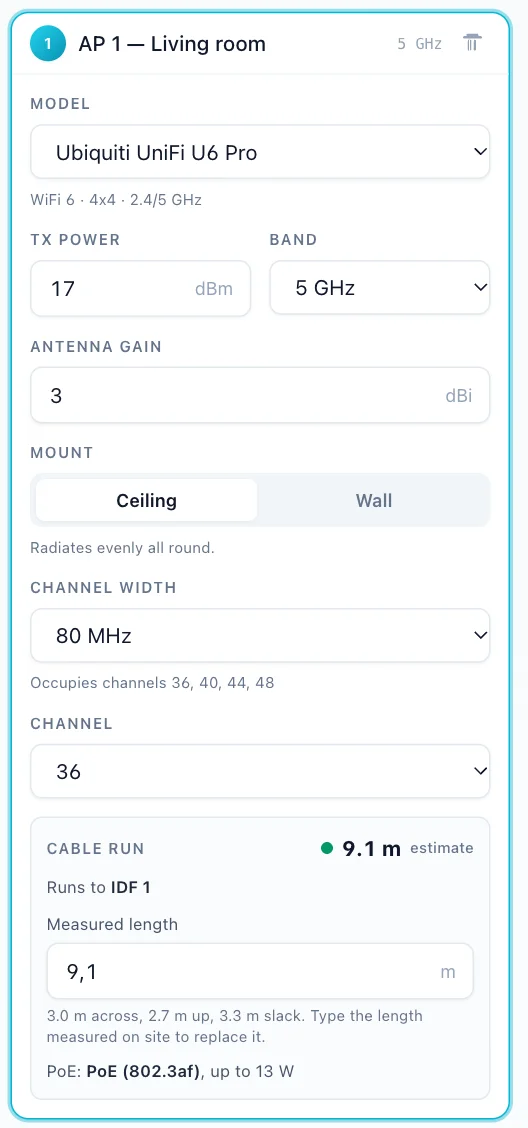
A prediction is only as good as the radio figures behind it. Every catalogue model carries its own transmit power and antenna gain from the vendor’s datasheet, per band, with the datasheet linked.
The catalogue Free
154 models from 20 vendors, checked against the vendors’ datasheets (catalogue dated 30 August 2026). Picking a model sets the access point’s transmit power, antenna gain and band; switching band re-reads that band’s own figures. 13 models whose vendor publishes no transmit power are marked as estimated. Models built for the wall (wall plates, in-wall units) are set to a wall mount when you pick them.
| Vendor | Models |
|---|---|
| Zyxel | 21 |
| Ubiquiti | 20 |
| Ruckus | 19 |
| Aruba | 12 |
| Cisco Meraki | 10 |
| Cisco | 9 |
| Alcatel-Lucent Enterprise | 6 |
| D-Link | 6 |
| Extreme Networks | 6 |
| Grandstream | 6 |
| Huawei | 6 |
| Ruijie | 6 |
| TP-Link | 6 |
| Fortinet | 5 |
| WatchGuard | 5 |
| Juniper Mist | 4 |
| Cambium | 2 |
| EnGenius | 2 |
| Netgear | 2 |
| MikroTik | 1 |
Any other radio
Pick Custom and type the transmit power and antenna gain from the datasheet. On every access point, catalogue or custom, each figure stays editable: turn a radio down to the power you will set it to, and the heatmap follows.
Ceiling or wall mount
A ceiling access point radiates its gain all round. Set one to Wall and it faces into the room: 65° off its front it is 3 dB down, along the wall 5.8 dB, and behind it 9 dB. That pattern is the median of Ubiquiti’s published antenna files for its wall units, so it is a generic wall-mount pattern, not any one model’s. Turn it with the knob on the plan or the Faces field.
Bands and channels
Each access point plans one band: 2.4, 5 or 6 GHz, with its channel width and channel. The editor flags channel conflicts between your own access points for free; Auto-assign Pro picks non-overlapping channels for the country you set, and only uses DFS channels when the others would clash.